
What Is Reverse Geocoding? How to Find Addresses from Latitude and Longitude
Reverse geocoding transforms raw GPS coordinates into real-world places you recognize. For example, a delivery driver, IoT sensor, or field technician might send "40.7154929, -74.0064758". Reverse geocoding turns that number pair into a street address, landmark, or neighborhood name you can use - "110 Duane Street, New York, NY 10007, United States of America".
Try it instantly with our free Latitude & Longitude to Address Tool. Paste a single coordinate pair or upload a spreadsheet, and GeoSearch.online cleans the data, finds the closest address, and enriches it with city, neighborhood, timezone, and more.
Table of contents
- What Does "Reverse Geocode" Mean?
- How Reverse Geocoding Works
- Why Teams Choose GeoSearch.online for Reverse Geocoding
- How to Use the GeoSearch.online Reverse Geocoder
- Real-World Ways No-Tech Teams Use Reverse Geocoding
- Frequently Asked Questions
What Does "Reverse Geocode" Mean?
The verb “to reverse geocode” means translating a pair of latitude and longitude values into a human-readable description of that location. Instead of typing an address and getting coordinates, you start with lat, lon and get back a building address, postcode, city, or landmark that people instantly recognize.
Reverse geocoding is what makes apps show “221B Baker Street” instead of just 51.5237, -0.1585. It’s how ride-hailing services confirm pickup spots, delivery platforms verify drop-off addresses, and analytics teams understand where devices are moving throughout the day.
| Coordinates | Address Level | Result |
|---|---|---|
48.8584, 2.2945 | Address | Eiffel Tower, Champ de Mars, 5 Avenue Anatole France, Paris |
40.7484, -73.9857 | Address | Empire State Building, 20 W 34th St, New York, NY |
-33.8568, 151.2153 | Address | Sydney Opera House, Bennelong Point, Sydney |
-33.8568, 151.2153 | Postcode | Nottoway County, VA 23824, United States of America |
35.6828, 139.7595 | City | Chiyoda City, Tokyo, Japan |
56.1304, -106.3468 | Country | Canada (country centroid) |
What Can Be Reverse Geocoded?
Reverse geocoders work with much more than exact building entrances. GeoSearch.online can interpret and enrich:
- Precise GPS pins — e.g.
40.712776, -74.005974→ “New York City Hall, Manhattan”. - Device or sensor trails — quickly label thousands of IoT pings with neighborhoods and time zones.
- Regional centroids — convert generalized coordinates (like a city’s center) into the closest administrative area.
- Offshore coordinates — return the nearest shoreline, body of water, or descriptive label when no street address exists.
- Different detail levels — pick the exact fields you need, from full address lines down to street, postcode, city, state, or country.
⚠️ Keep in mind that coordinates describe a point. If the point falls between addresses (for example, in the middle of a park or parking lot) the result will mention the closest known entrance, landmark, or area boundary.
What a Reverse Geocoder Returns
When you drop in a coordinate pair, a good reverse geocoder does more than spit back a single line of text. Here’s a real GeoSearch.online lookup to show what comes back.
Example input
37.51631822140348, -77.45666590701694 (plus_code 8794GG8V+G8) — a point in Richmond, Virginia.

GeoSearch.online reverse geocoder enriches a single GPS coordinate with full address details, time zone, and administrative context.
Key fields returned
- Formatted address: 2509 Bainbridge Street, Richmond, VA 23225, United States of America.
- Core components — country
United States, stateVirginia (VA), cityRichmond, postcode23225, streetBainbridge Street, house number2509. - Neighborhood context — district
Swansboro, suburbOld South, countyCity of Richmond (RC). - Result details — type
building. - Precision insight — matched point
37.5164654, -77.45677012558644, onlydistancefrom the submitted coordinates. - Time zone info —
America/New_York, standardEST, daylightEDT. - Helpful extras — plus code and a bounding box for quick mapping.
Having structured fields means you can feed the output straight into CRMs, logistics software, BI dashboards, or spreadsheets without manual cleanup.
How Reverse Geocoding Works
Reverse geocoding feels instant inside GeoSearch.online, but under the hood there’s a carefully tuned pipeline that squeezes the most context out of every coordinate.
- Validate the coordinate — we sanity-check the latitude/longitude pair, snap it to the correct hemisphere, and catch typos before they return nonsense.
- Score every nearby feature — the engine looks for the nearest building footprints or administrative boundaries (when you ask for broader levels), sorts them by distance, and keeps the most relevant candidate.
- Pick the clearest match — once the best feature is found, the reverse geocoder assembles its address hierarchy: house number, street, city, state, country, and any neighborhood tags.
- Enrich the output — before showing results, GeoSearch.online adds helpful extras such as time zone, plus code, bounding box, and OpenStreetMap attribution so you can reuse the data safely.
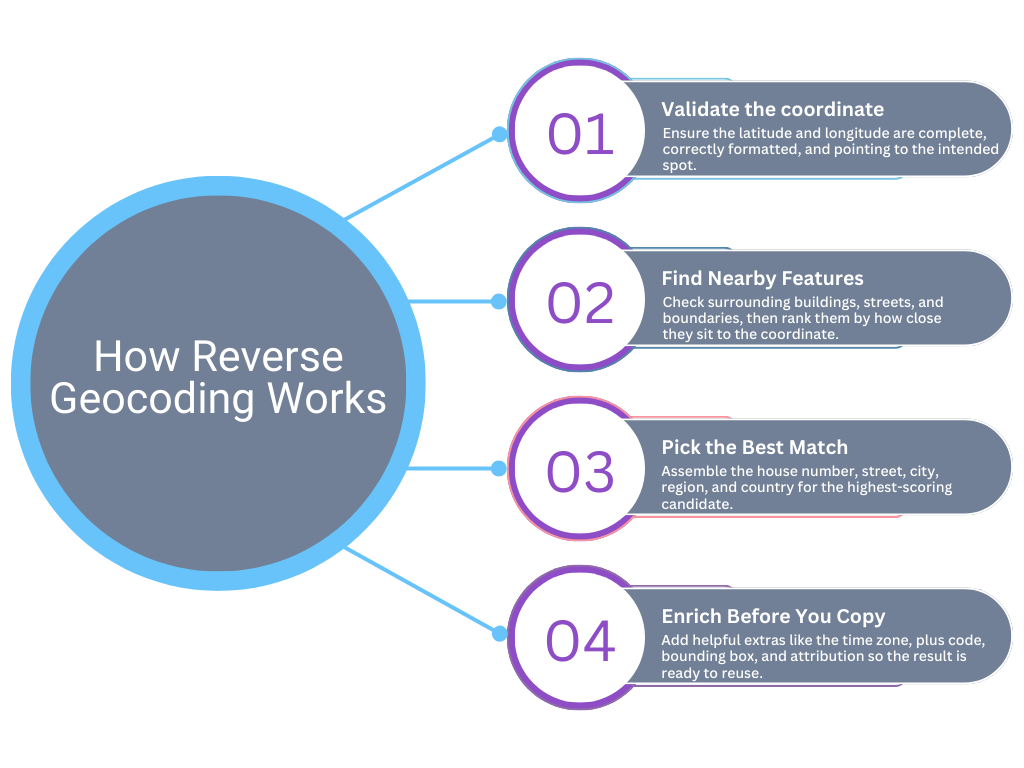
Four steps inside GeoSearch.online: validate the coordinate, rank nearby features, pick the best match, and enrich the final address.
Because everything happens in the browser, you can paste a single GPS ping, drag-and-drop a spreadsheet, or tweak the requested detail level without touching code. Need a city-level summary for analytics? Choose that column. Need a delivery-ready address? Toggle the full line and copy it out.
Why Teams Choose GeoSearch.online for Reverse Geocoding
Reverse geocoding is available in plenty of places, but GeoSearch.online is built to help non-developers ship location-ready data in minutes.
- Works straight from the browser — no installs, no API keys, just paste coordinates and get results you can trust.
- Bulk-friendly by design — upload CSV or Excel files, preview enriched data instantly, then download or copy only the columns you need.
- Automatic data cleaning — trim whitespace, normalize decimal separators, and flag malformed latitude/longitude pairs before they ruin your reports.
- Rich contextual fields — go beyond “nearest address” with neighborhoods, postcodes, county, time zone, and plus codes baked in.
- Formats made for analysts — export tidy outputs that fit perfectly into spreadsheets, BI dashboards, or GIS layers.
- Powered by OpenStreetMap — get global coverage with community-maintained data, updated frequently and clearly attributed.
Whether you’re validating on-site check-ins, labeling IoT pings, or preparing delivery manifests, GeoSearch.online keeps the process fast, predictable, and comfortable for anyone on your team.
How to Use the GeoSearch.online Reverse Geocoder
- Open the Latitude & Longitude to Address tool.
- Paste a coordinate pair or upload your TXT, CSV, or XLSX file, then click Geocode.
- Pick the detail level you want—full address, separate columns, or a city-only summary.
- Check the results view, download the enriched table as CSV/Excel, or copy the rows you need. Planning bigger runs? Keep the pricing page in mind.

Choose between processing the first 2500 rows for free or running your entire dataset for a one-time fee.
Real-World Ways No-Tech Teams Use Reverse Geocoding
Reverse geocoding goes far beyond adding addresses to a spreadsheet. Here are a few everyday scenarios where GeoSearch.online helps teams who prefer point-and-click tools:
- Activity check-ins — give sales, inspections, or service teams instant context about where on-site visits actually happened—no GIS expertise required.
- Marketing & growth — segment campaigns by neighborhood or time zone so marketers can launch hyper-local offers without writing a line of code.
- Research & civic projects — help scientists or urban planners label field observations, sensors, or survey points with the nearest address or boundary.
- GIS & mapping support — let GIS specialists fast-track ad-hoc requests by exporting clean address-enriched layers that colleagues can use immediately.
- Compliance & auditing — keep a paper trail of where sensitive data was collected or processed, even when teams only capture GPS points in the field.
Frequently Asked Questions
Is the tool really free for 2500 rows?
What file formats can I upload?
How accurate are the results?
Can I choose which columns to export?
What if I have more than 2500 rows?
Do I need coding skills or an API key?
Can I track a paid job after checkout?
Does it work for rural or offshore coordinates?
What extra fields come with each result?
Can I choose the language of my results?
Ready to try it yourself? Head over to the Latitude & Longitude to Address tool and paste your first coordinates. For a single address or coordinate lookup with map preview and export actions, try Reverse Address Lookup.